
 fogwind
eaee4e3889
readme修改
fogwind
eaee4e3889
readme修改
|
před 3 měsíci | |
|---|---|---|
| @types | před 5 měsíci | |
| public | před 3 měsíci | |
| src | před 3 měsíci | |
| .env.example | před 5 měsíci | |
| .gitignore | před 5 měsíci | |
| .npmrc | před 5 měsíci | |
| README.md | před 3 měsíci | |
| changelog.md | před 5 měsíci | |
| eslint.config.mjs | před 5 měsíci | |
| hero.ts | před 5 měsíci | |
| license.md | před 5 měsíci | |
| next.config.ts | před 3 měsíci | |
| package.json | před 4 měsíci | |
| pnpm-lock.yaml | před 4 měsíci | |
| postcss.config.mjs | před 5 měsíci | |
| tsconfig.json | před 5 měsíci |
README.md

Website | Documentation | Forums | Community



Bagisto Next.js Commerce
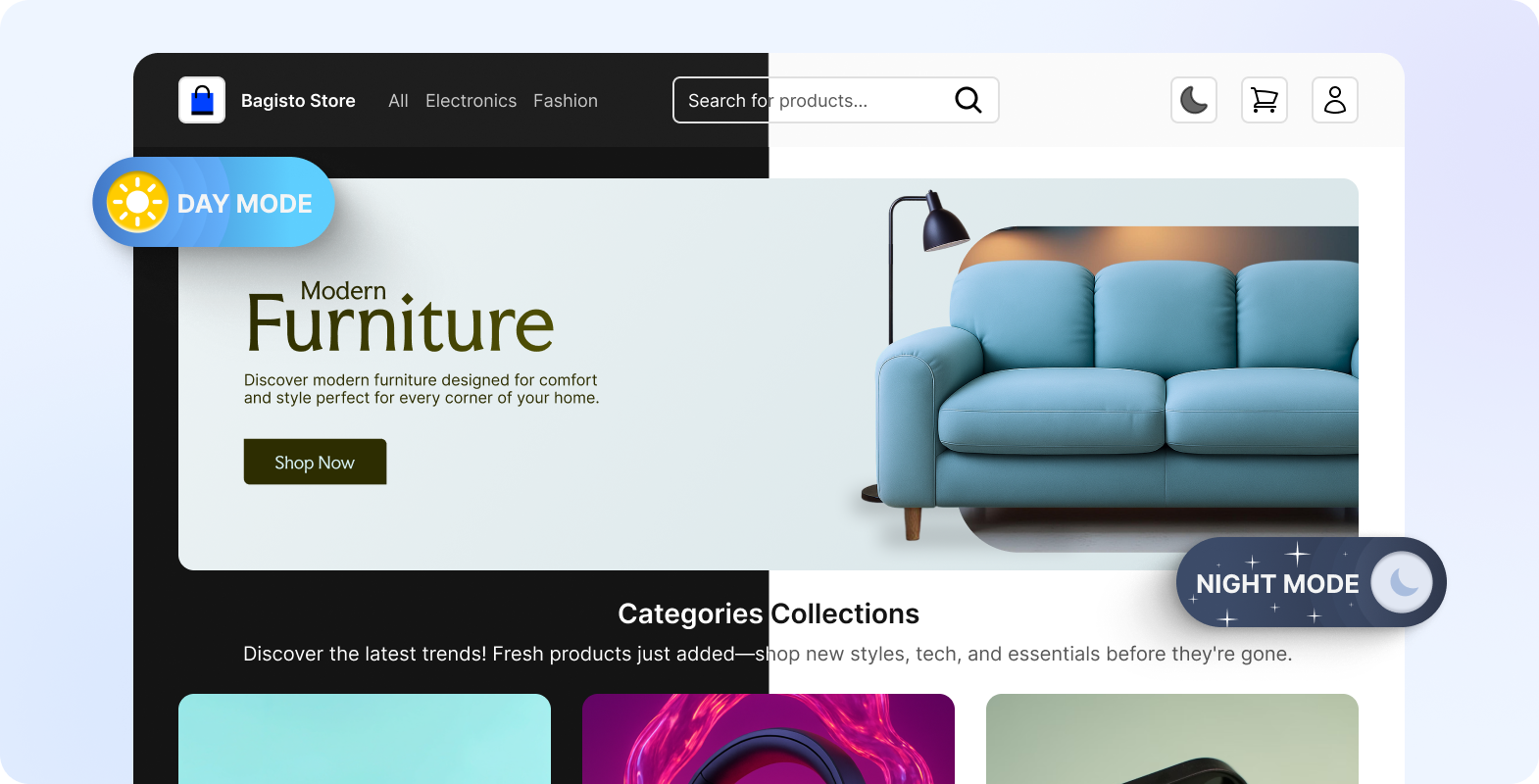
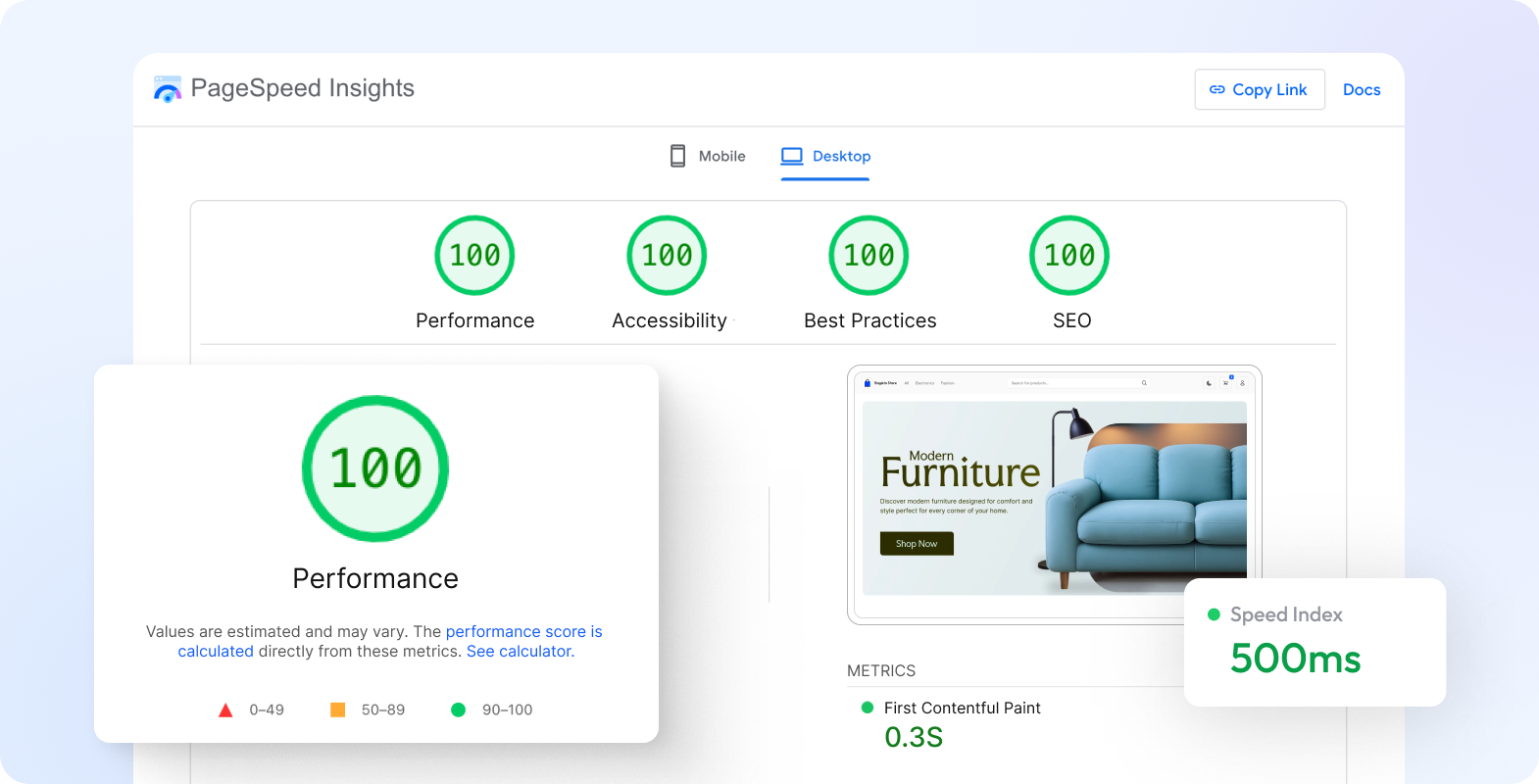
A headless eCommerce framework built with Next.js and powered by Bagisto, designed for modern scalability and flexibility. Through layered caching and optimized rendering strategies, it consistently achieves a 100/100 Core Web Vitals score, delivering lightning-fast performance and seamless shopping experiences.
Check the Documentation to quickly set up your Headless eCommerce store.
Bagisto Version: v2.3.0
Bagisto GraphQL API: v2.3.0
Features
- Ultra-fast storefront with 100/100 Core Web Vitals score.
- Layered caching for API responses and page rendering.
- Fully responsive and mobile-friendly design.
- SEO optimized with meta tags, OpenGraph, and Twitter cards.
- Secure authentication via NextAuth.js.
- Powered by Bagisto GraphQL APIs for robust commerce functionality.
- Incremental Static Regeneration (ISR) with revalidation.
Bagisto Open Source Headless eCommerce is optimized to deliver a 100/100 Core Web Vitals score across devices, ensuring top-tier performance and user experience.
Prerequisites
Before you begin, ensure you have the following installed:
- Node.js 18+ and pnpm
- Check Bagisto backend requirement detail
Installation
1) Install Bagisto
Begin by [installing the Bagisto](https://devdocs.bagisto.com/) eCommerce platform on your server or local environment.
2) Install the Bagisto Headless Extension
After installing Bagisto, install the [Bagisto Headless Extension](https://github.com/bagisto/bagisto-api) to expose the required APIs for your frontend.
3) Get your storefront up and running in one command:
npx -y @bagisto-headless/create your-storefront
4) Configure .env.local in the Next.js Project
In your Next.js frontend project, create or update your .env.local file with the following variables:
| Variable | Description | Example |
|---|---|---|
NEXT_PUBLIC_BAGISTO_ENDPOINT |
Enter Your Bagisto Shop URL | https://your-store.bagisto.com/ |
NEXT_PUBLIC_BAGISTO_STOREFRONT_KEY |
Enter Your Bagisto Storefront Key | pk_storefront_************************* |
NEXT_PUBLIC_NEXT_AUTH_URL |
Enter Your Headless Shop URL | https://headless-store.com/ |
NEXT_PUBLIC_NEXT_AUTH_SECRET |
Enter Your Headless Shop Secret | Generate with openssl rand -base64 32 |
COMPANY_NAME |
Enter Your company name | Bagisto Headless Store |
关于NEXT_PUBLIC_NEXT_AUTH_URL和NEXT_PUBLIC_NEXT_AUTH_SECRET本来是next-auth要用的,next-auth文档中这两个变量名是NEXTAUTH_URL和NEXTAUTH_SECRET,bagisto官方给改成了NEXT_PUBLIC_NEXT_AUTH_URL和NEXT_PUBLIC_NEXT_AUTH_SECRET,但是没有改彻底(估计也改不彻底,因为next-auth没有暴露NEXTAUTH_URL的自定义接口)导致next-auth根本无法获取到NEXT_PUBLIC_NEXT_AUTH_URL,导致用户退出登录时signout接口返回的域名是默认的localhost:3000
Important Notes
- You will need to use the environment variables defined in
.env.exampleto run Next.js Commerce. - It’s recommended to use Vercel Environment Variables, but a
.envfile is sufficient for local development. - Never commit your
.envfile to version control — it contains secrets that would allow others to control your Bagisto store.
One-Click Deploy to Netlify
Click the button above to deploy your own copy of Bagisto Headless eCommerce to Netlify instantly!

Vercel Setup
Install the Vercel CLI:
npm i -g vercel
Link your local instance with Vercel and GitHub accounts (this creates the .vercel directory):
vercel link
Download your environment variables:
vercel env pull
Run the development server:
pnpm dev
Build for production:
pnpm build
pnpm start
Usage
Start the development server:
pnpm dev
Access the store at:http://localhost:3000
Products
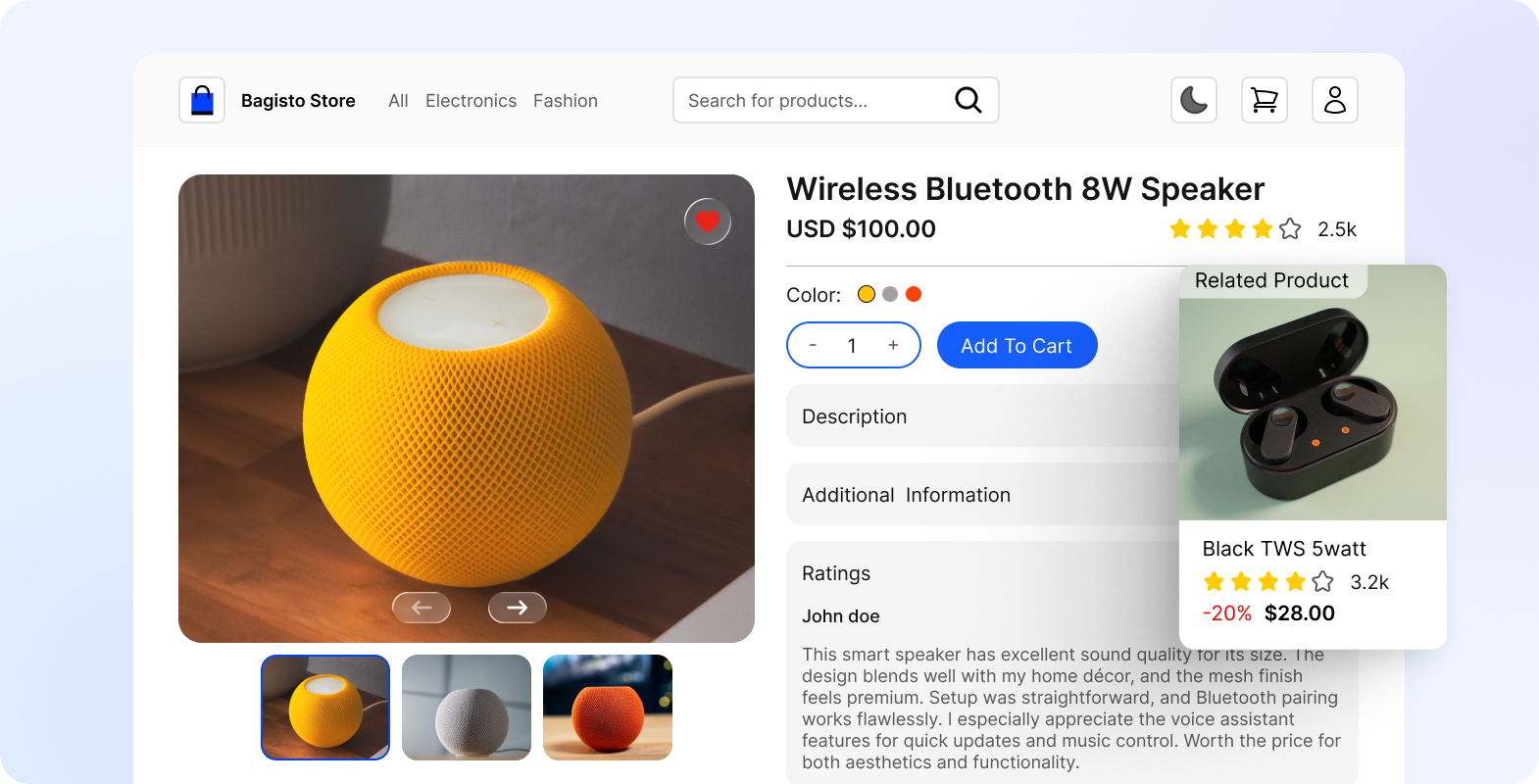
The Open Source Headless eCommerce allows users to browse a wide range of products with built-in pagination and search functionality. Each product has its own detailed page showcasing images, descriptions, pricing, reviews, and availability.
Bagisto Headless Commerce APIs support multiple product types, including simple, configurable, bundled, and downloadable products, ensuring flexibility for different business needs.
Categories
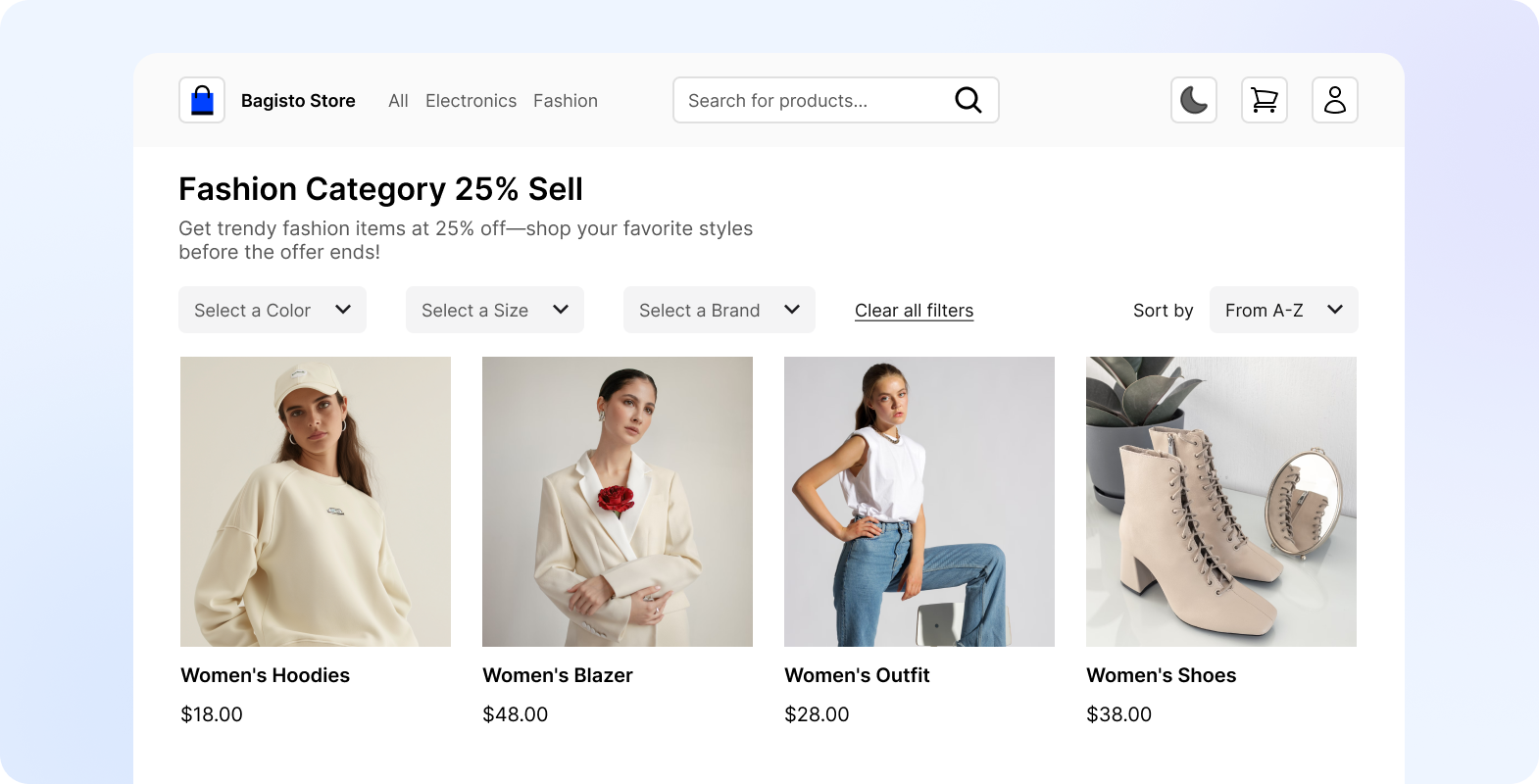
Products are neatly organized into hierarchical categories, making it easy for customers to navigate the store. Each category page displays relevant product listings with filtering and sorting options for a better shopping experience.
The Open Source Headless eCommerce also ensures SEO-friendly category URLs with meta titles, descriptions, and breadcrumbs for improved discoverability.
Checkout
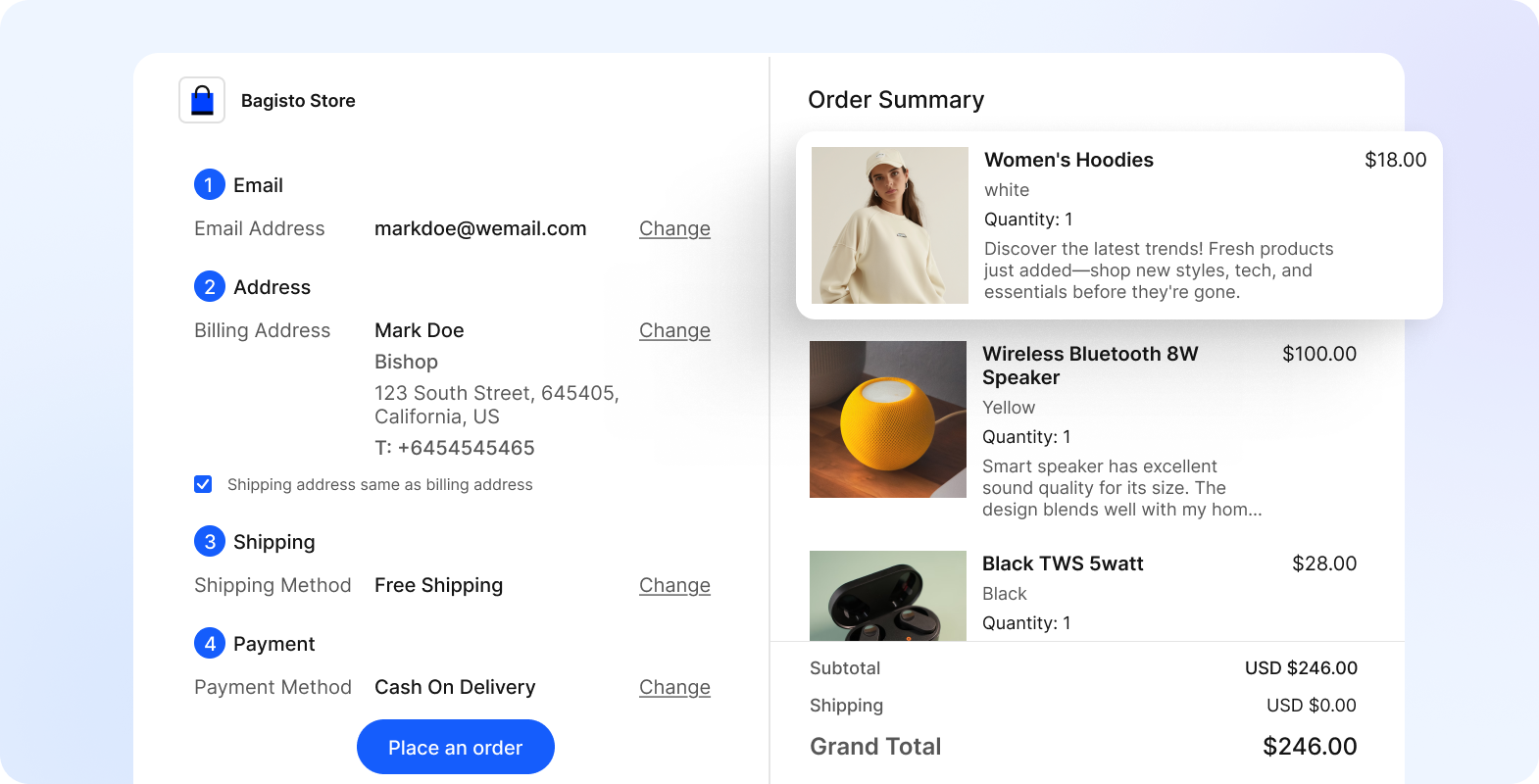
The checkout process is fully functional, featuring complete cart management where customers can add, update, or remove items.
Both guest and logged-in users can proceed through checkout, selecting shipping addresses and preferred payment methods.
Once the order is placed, it is instantly synchronized with the Bagisto backend, enabling smooth order processing and management.
Community
Get Bagisto Headless Commerce support on Facebook Group and Forum
License
Bagisto headless eCommerce framework that will always remain free under the MIT License.
Security Vulnerabilities
If you think that you have found a security issue in Bagisto Headless Commerce, please do not use the issue tracker and do not post it publicly. Instead, all security issues must be sent to mailto:support@bagisto.com.
关于Next.js的缓存机制
https://www.cnblogs.com/xibaoyu/p/18898224
关于next-auth
https://next-auth.js.org/getting-started/introduction
关于.env
.env中NEXTAUTH_SECRET字段的值是openssl rand -base64 32 生成的,应该是生成token时或者session签名时用到
本地开发时把根目录下的.env.example复制一份,文件名改为.env或者.env.local,测试站配置如下:
# Bagisto API Configuration
# 测试站网址
NEXT_PUBLIC_BAGISTO_ENDPOINT=https://sisbridal.com/
# 测试站api key
NEXT_PUBLIC_BAGISTO_STOREFRONT_KEY=pk_storefront_5JHJ7e8Vb10aCmlTexi5OaaFRqPYsrOy

# NextAuth Configuration
# 本地开发的域名
NEXTAUTH_URL=http://localhost:3001
# NextAuth 使用 secret(下面的值)对 session中的token 对象进行 签名 + 加密,生成一个 JWT 字符串,解密这个JWT字符串就可以还原token对象。
# 由命令: openssl rand -base64 32 生成
NEXTAUTH_SECRET=9jstKgQ1Q22PlDDhPtXTZ6G4MEzHGDJIkebcd/5UyZ4=

# Application Settings
# 本地开发时可以随便写个
COMPANY_NAME=Your Company Name
关于dangerouslySetInnerHTML和JSON-LD
关于购物车token
官方原来的逻辑: 下单成功后,之前的购物车token就会失效,需要重新创建购物车token。
但是下单成功后代码中并没有删除原来的购物车token,也没有获取新的购物车token。此时用户再加购物车,接口会返回来新的购物车token,而代码中也没有把旧购物车token替换成新的购物车token(当cookie里有购物车token但该token失效时,加购接口返回数据中的cartToken字段才是购物车token,否则cartToken字段是购物车id)。
关于ApolloClient
如何指定接口返回数据的数据类型: https://www.apollographql.com/docs/react/data/typescript
ApolloClient错误处理
Apollo Client supports the following error policies:
| Policy | Description |
|---|---|
| none | If the response includes errors, they are returned in the error field and the response data is set to undefined even if the server returns data in its response. This means network errors and GraphQL errors result in a similar response shape. This is the default error policy. |
| ignore | Errors are ignored (error is not populated), and any returned data is cached and rendered as if no errors occurred. Note: data may also be undefined in the event a network error occurs. |
| all | Both data and error are populated and any returned data is cached, enabling you to render both partial results and error information. |
The default value is none, which tells Apollo Client to treat all GraphQL errors as runtime errors. In this case, Apollo Client discards any query response data returned by the server and sets the error property in the useQuery result object.
If you set errorPolicy to all, useQuery does not discard query response data, allowing you to render partial results.
apollo client 中的错误分类:
| 错误类型 | 触发场景 | Promise 状态 | 捕获方式 | 与 errorPolicy 的关系 |
|---|---|---|---|---|
| GraphQL 错误(字段校验、权限、业务逻辑抛出) | 服务器返回 200,errors 数组有内容 | resolve(不会被 reject) | 检查返回值中的 errors 数组;useQuery 中通过 error 属性 | errorPolicy 决定 data 是部分数据还是 undefined,以及是否暴露 errors |
| 网络错误(断网、DNS 解析失败、CORS、服务器 5xx 等) | 请求根本没到 GraphQL 引擎,或没有合法响应 | reject | try...catch 包裹异步调用,或 .catch() 方法;useQuery 中通过 error.networkError | 不影响网络错误的处理,此时通常没有 data,errorPolicy 作用有限 |
关于注册和登录流程
next-auth只负责登录和校验用户
关于cookie的携带
fetch 不会发送跨域 cookie,除非明确指定 credentials 的值允许跨域发送cookie。( credentials 的默认值为 same-origin,表示仅在同源的请求中发送 cookie。)
也就是说本项目中用bagistoFetch调后端接口(php后端)时是不向php后端发送cookie的。
在浏览器中使用ApolloClient,是先调本项目的代理接口,再由代理接口调后端接口,代理接口中还是用的bagistoFetch调后端接口。
在服务端直接使用ApolloClient时,cookie会发送给后端,因为/src/lib/apollp-client.ts中明确指定了credentials的值是 'include'。
ApolloClient底层也是用的fetch函数发起的请求。
关于useEffect
useEffect 只会在客户端执行,具体是在浏览器绘制后执行,服务端渲染时不会运行(Next.js 在服务器端会跳过所有 useEffect / useLayoutEffect)。
关于自定义hook
自定义hook是组件代码的一部分(也就是说跟你把代码直接写在组件里没啥区别),其共享的是代码逻辑不是状态。 组件重新渲染,自定义hook也会重新执行。
TODO
需要做的工作:
- 注册成功后需要走next-auth的登录流程
登录成功后需要合并购物车(在服务端完成) -- 待定
createCart 接口报错 -- 已解决
由于apollo client缓存策略以及graphql代理接口问题导致获取不到数据 -- 已解决 3和4的问题是相互关联的
尝试升级apollo client版本到v4 -- 完成
jwt-cookie 放弃base64编码,尝试改为加密解密
登录状态点击退出登录后GetCartItem接口会报错 -- 待处理 错误信息: debugMessage: "Call to a member function load() on null" file: "/var/www/html/nshop/packages/Webkul/BagistoApi/src/State/CartTokenProcessor.php" line: 913
apollo client 升级后需要用新的方法设置返回数据的类型 -- 已完成
Apollo client的错误处理机制 (src\graphql\catalog\queries\GetFilterAttributes.ts 这个接口可以测试错误)
产品详情页代码优化 --- 已完成
代码eslint检查修改 -- 已完成
下单成功后需要重新创建购物车token -- 无需处理
详情页缓存策略(不要缓存吧)
getSession 过期提示重新登录
checkout 页面 src\components\Portal.tsx (15:33) 会报 document is not defined -- 已解决
redux cartDetail 里的billingAddress 和 shippingAddress 字段改到cart里的billingAddress 和 shippingAddress以及保存完地址后同步到redux
redux 中 cartDetail 异步获取数据 https://chat.deepseek.com/share/76kj30h2cws9jcl4jt -- 已完成
需要一个遮挡整个视口的loading组件 -- 已完成
结账页地址模块还差两个功能:登录用户从地址列表选择地址;未登录用户输入邮箱后判断是否注册过,如果注册过让用户登录;
登录用户结账页支付失败后要跳转到支付失败页面提醒用户可以再次支付 -- 待定
游客结账页支付失败或者取消支付,先调paymentCallback 再调cancelOrder。但是不删除cookie里之前的cartToken --- 完成
顶部header 栏 优化:可设置显示标题还是通用
个人中心取的是localStorage里的email,即使cookie里的token删除了,localStorage里的email会一直存在, 需要废弃localStorage里的email;
删除老的checkout页面的组件 -- 已完成
resetGuestToken 有问题,改为退出登录后不调resetGuestToken。
useAddProduct优化
下单成功页客服工具,分享
cancelOrder接口报错 -- 已解决
购物车数据管理方案 -- 已完成
货币列表,国家列表等关于商城配置的数据采用全局ConfigProvider管理;
当前货币等采用redux管理;
关于购物车数据管理方案
ssr + redux: 第一次渲染时在服务端获取数据存入redux,后续在客户端操作时更新redux。 购物车页和结账页不从redux中取数据,在服务端重新获取。 但是在购物车页和结账页对购物车数据做的修改需要同步到redux。
关于结账页地址
如果用户在结账页新建一个地址,这个地址的type是 cart_billing/cart_shipping。 用户点击支付按钮创建订单,订单创建成功后,根据购物车里的地址信息创建新的billing、shipping地址,地址type是order_billing/order_shipping。
GetCartItem,CreateMergeCart 接口报500 (已解决)
需要前端处理错误,不能直接报错。
解决方案:
- GetCartItem 是在bagistoFetch请求方法中对GetCartItem接口的错误进行拦截
- CreateMergeCart 是在登录后判断游客状态时的购物车,购物车中有数据时才调CreateMergeCart接口
按照官方的说法,当购物车为空时,调GetCartItem接口确实会报500(cart not found),有意为之。理想逻辑是只有用户进行加购操作的时候才会创建cartToken。
现在理一下逻辑: 用户登录时会返回一个token,这个token只是后端校验用户信息的token,并不是cartToken。 也就是说虽然用户登录了,也创建了cartToken,但是购物车没激活,所以GetCartItem接口会报500。只有当用户进行加购操作的时候才会激活购物车。
关于paypal
文档: https://docs.paypal.ai/reference/sdk/react
关于hook
hook 的定义:
Hook 是 React 在 render 过程中注册状态依赖的函数调用点,而不是函数命名或形式。 不是“所有函数都是 hook”,而是“只有参与 React render 状态系统的函数才是 hook”。
真正的hook 必须满足下面的条件:
- 以 use 开头(约定,不是本质)
- 在 render flow 中执行
- 调用 React 内部 Hook API
- 受 Hook 规则约束(顺序调用)
要清楚hook的定义,不然遇到hook被叫烂的情况,你会很迷惑。
关于 server actions
- https://juejin.cn/post/7540970969751617546
- https://developer.aliyun.com/article/1688619
- https://zh-hans.react.dev/reference/rsc/server-functions
useFormState 已弃用,重新命名为 useActionState